The REST API is the quiet engine of modern WordPress: the block editor, mobile apps and many plugins depend on it. But part of this API answers anyone, without authentication, and can hand over the list of your accounts. This article explains what is public by default, what is a problem, and how to restrict the API without breaking the editor.
What the REST API is for
Built into core since WordPress 4.7, the REST API exposes the site's content as structured data, available at URLs starting with /wp-json/. It lets a program read or write posts, pages, categories or comments without going through the classic interface. The block editor uses it constantly: every time a draft is saved, that is a request to the API.
This architecture is a strength. The problem is not the API itself, but the fact that some of its routes answer anonymous visitors, by design, so that public content remains accessible.
What is public by default
Several routes return data without authentication. Most are harmless: they expose what is already visible on the site.
| Route | Content returned | Sensitivity |
|---|---|---|
| /wp-json/wp/v2/posts | Published posts | Low (already public) |
| /wp-json/wp/v2/pages | Published pages | Low |
| /wp-json/wp/v2/categories | Categories and tags | Low |
| /wp-json/wp/v2/comments | Approved comments | Low to medium |
| /wp-json/wp/v2/users | Authors who have published at least one post | High (enumeration) |
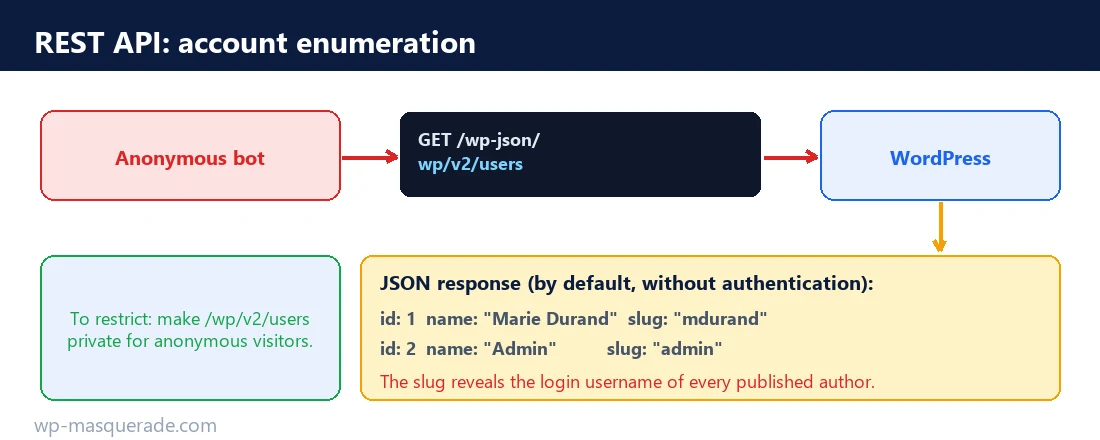
The sensitive route is the last one. By default, /wp-json/wp/v2/users returns, without any authentication, the list of users who have published at least one post of a public post type. For each one, the response includes the numeric ID, the display name and, above all, the slug, which is derived from the login username.
Why account enumeration matters
Knowing the login usernames does not grant access, but it is the first half of an attacker's work. With the list of real usernames, a brute force or credential stuffing attack becomes much more effective: all that is left is finding the password. Handing out account names for free is like pointing out which lock to work on.
Enumeration does not only go through the REST API. The older /?author=1 paths, the authors sitemap and oEmbed embedding can also reveal these names. Consistent protection deals with them together; otherwise, closing one door while leaving the others open achieves nothing.
Restricting without breaking the editor
The classic mistake is to disable the REST API entirely with a heavy-handed plugin. The result: the block editor can no longer save, some admin functions break, and legitimate plugins stop working. The goal is not to close everything, but to close what needs to be closed.
- Keep the API active for authenticated users. The editor works with a security token (nonce) that proves the request comes from a logged-in session. Do not touch this mechanism.
- Restrict the users route for anonymous visitors. Technically, this means requiring the
list_userscapability on/wp/v2/users, so that a logged-out visitor gets an empty response or an error, while an administrator keeps access. - Also close the other enumeration paths:
/?author=author archives, the authors sitemap and the oEmbed discovery. - Test after each change: saving a draft, inserting media, previewing, then the plugins you actually use.
Watch out for one detail: removing the API discovery link (the <link rel="https://api.w.org/"> tag in the page head) does not disable the API. It only reduces the clues given to automated tools. To really block a route, you have to act on its permission, not on its discovery link.
Checking your site
The test is simple and requires no tools. From a private browsing window, that is, without being logged in, open your site's /wp-json/wp/v2/users URL. If you see a list of users with their slug, the route is exposed. If you get an empty response or an authorization error, it is closed to anonymous visitors. Do the same with /?author=1 to check that it does not redirect to an archive bearing the login name.
How WP Masquerade handles these routes
WP Masquerade Pro approaches enumeration as a consistent whole. Its hardening module blocks author archives and public /wp/v2/users requests for anonymous visitors, while keeping the other REST routes and authenticated users available. The block editor therefore keeps working. In parallel, the technical links module removes the REST API and oEmbed discovery links, which serve as clues for scanners.
The plugin's guide is honest about the scope of the measure: blocking the users route reduces some means of enumeration, but does not hide a name already published elsewhere, for example in a post's byline. It is a reduction of the attack surface, not a disappearance. Combined with strong passwords and login limiting, it simply makes the attacker's work slower and noisier.
Legitimate uses you must not break
Before restricting anything, you need to know who relies on the REST API on your site, or you risk cutting off a useful feature. Several perfectly legitimate uses go through it.
- The block editor, which continuously saves, retrieves and formats content.
- Mobile apps, official or third-party, that publish to the site.
- Headless integrations, where a separate front end consumes the content through the API.
- Some plugins (forms, stores, bookings) that expose their own routes.
The golden rule is therefore to restrict precisely, route by route, rather than block everything. A plugin that promises to "disable the REST API" indiscriminately is a bad choice: it solves one enumeration problem by creating several others, sometimes invisible until a customer complains that a form no longer works.
Application passwords, the right door for automation
If an external service needs to write to your site through the API, do not give it an administrator's password. Since version 5.6, WordPress offers application passwords: dedicated credentials, revocable one by one, used to authenticate API requests without exposing the main password. Each integration gets its own, and the day a service is no longer used, you revoke its access without touching anything else.
This approach limits the damage in case of a leak: a compromised application password can be revoked in one click, and its scope remains that of a single service. It is also the mechanism an account protected by two-factor authentication uses to keep talking to the API and XML-RPC, since these channels no longer accept the regular password once the second factor is enabled.
Read also: MCP in WordPress: what the Model Context Protocol changes and how to make the most of it.
Key takeaways
- The REST API is public by design for content that is already visible; the sensitive point is the /wp/v2/users route.
- This route hands authors' login usernames to anonymous visitors.
- Do not disable the whole API: the block editor needs it. Restrict only the sensitive routes.
- Also close /?author=, the authors sitemap and oEmbed for consistent protection.
Sources
- WordPress Developer, REST API Handbook (opens in a new tab)
- WordPress Developer, Users endpoint reference (opens in a new tab)
Other sources consulted: official documentation.