Before trying an exploit, a bot needs to know what it is talking to. A single page of your site is often enough for it to conclude "WordPress", and a few more requests let it list your plugins and their versions. This article details the exact signals Wappalyzer and WPScan rely on, what you can cleanly remove, and what will stay visible no matter what you do.
Quick definition: Fingerprinting. Ready-made solution: Make WordPress look like another CMS with WP Masquerade.
Why identification comes before the attack
Automated attacks on WordPress rarely target "your" site. They target a specific plugin version known to be vulnerable, across thousands of sites at once. To sort those sites, a bot answers three questions in order: is it WordPress? Which core version? Which plugins, and which versions?
WPScan illustrates this logic well. By default, when it looks for plugins in aggressive mode, it does not test every existing plugin: it tries the list of plugins known to have a vulnerability in its database. A site that gives no useful answer to these questions drops out of the queue faster; a site that announces everything ends up in the right bucket.
Passive signals: what the home page reveals
A "passive" tool sends no special requests: it reads the HTML, headers and JavaScript of the page any visitor receives. That is how the Wappalyzer browser extension works.
The generator tag
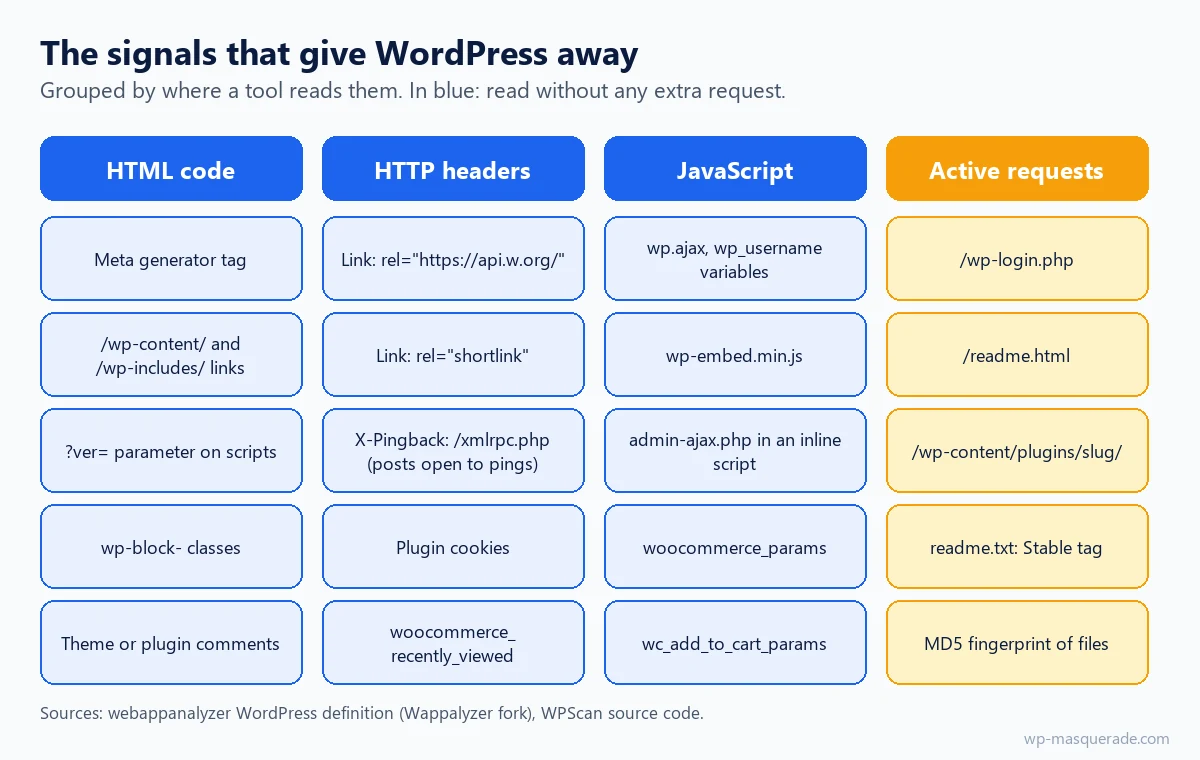
By default, core hooks the wp_generator function into wp_head. It outputs <meta name="generator" content="WordPress 6.9" /> with the exact version number. The same information appears in the feeds: <generator> in RSS 2 and the version attribute in Atom. Removing the tag from the <head> without handling the feeds therefore leaves the version readable at /feed/.
The /wp-content/ and /wp-includes/ paths
Stylesheets, scripts, images: nearly every asset of a WordPress site is served from /wp-content/ (themes, plugins, media) or /wp-includes/ (core libraries). This is the most robust signal, and as a bonus it gives away plugin names: /wp-content/plugins/plugin-name/ appears in plain text in the source code.
The ver= parameter
Core scripts and styles are registered with a default version equal to the WordPress version (default_version = get_bloginfo( 'version' ) in script-loader.php). Not all of them use it (jQuery carries its own number), but a script registered without a version, such as wp-includes/js/comment-reply.min.js, is served with ?ver= followed by the core version, even when the generator tag is gone. Plugins, for their part, often pass their own version number in that same parameter.
HTTP headers
Link: <https://example.com/wp-json/>; rel="https://api.w.org/": sent byrest_output_link_header()on public pages to advertise the REST API. Wappalyzer recognizes it directly.X-Pingback: since WordPress 4.4, it is only sent on single content (a post or page) that accepts pings, and it points toxmlrpc.php.- Shortlinks:
wp_shortlink_header()adds aLinkheader of typeshortlinkon content.
JavaScript and CSS classes
The block editor leaves wp-block-... classes in published content. On the JavaScript side, objects such as wp.ajax, a wp_username variable or the wp-embed.min.js script are enough for Wappalyzer. WooCommerce adds its own markers (woocommerce_params, wc_add_to_cart_params).
| Signal | Where to see it | Reveals the version? | Read by |
|---|---|---|---|
| Generator tag | <head> of every page | Yes, exact | Wappalyzer, WPScan |
| Feed generator | /feed/, /feed/atom/ | Yes, exact | WPScan |
| wp-content, wp-includes paths | Source code | No (but plugin names) | Wappalyzer, WPScan |
ver= parameter | Script and style URLs | Often | WPScan |
| api.w.org Link header | HTTP response | No | Wappalyzer |
| X-Pingback | HTTP response (posts) | No | Wappalyzer |
| JavaScript variables | Page scripts | No | Wappalyzer |
Plugin readme.txt | Dedicated request | Yes (Stable tag) | WPScan |
| MD5 fingerprints | Requests for static files | Yes | WPScan |
How Wappalyzer decides
Wappalyzer compares the page against a database of definitions: for each technology, a list of regular expressions to look for in the HTML, meta tags, headers, cookies, script URLs and JavaScript variables. The original repository went private in August 2023; the database lives on in open projects such as webappanalyzer (Enthec), which keeps the same format.
The "WordPress" definition in that database is short and instructive:
meta generator:^WordPress(?: ([\d.]+))?, capturing the version number;headers:X-Pingbackending in/xmlrpc.php, andlinkcontainingrel="https://api.w.org/";scriptSrcandhtml:/wp-content/or/wp-includes/paths,wp-embed.min.js;js:wp.ajax,wp.receiveEmbedMessage,wp_username;implies: PHP and MySQL. The WooCommerce definition, for its part, requires WordPress (requires).
The practical consequence: a single signal is enough. Removing the generator tag does not change the verdict as long as /wp-content/ paths remain in the page. Conversely, a site that exposes the markers of other software will be filed under that other software by the same mechanism.
How WPScan goes further
WPScan is a security scanner dedicated to WordPress, used by auditors and attackers alike. Its source code is public, so we know exactly what it looks for:
- WordPress detection: the home page and a 404 page are examined (paths, generator, HTML comments mentioning WordPress,
admin-ajax.phpin an inline script). In mixed or aggressive mode, it also loadswp-login.phpandwp-admin/install.php. - Core version: RSS, Atom and RDF feed generators,
readme.html(low confidence for recent versions), then fingerprints: it compares the MD5 of static files with a database of known checksums, at 100% confidence. - Plugins: URLs seen on the home page and the 404 page, patterns in headers, comments and JavaScript variables, then requests to
/wp-content/plugins/slug/. A 200, 401, 403 or 500 response counts as present. - Plugin versions: reading
readme.txt, either theStable tagfield (confidence 80) or the changelog section (confidence 50).
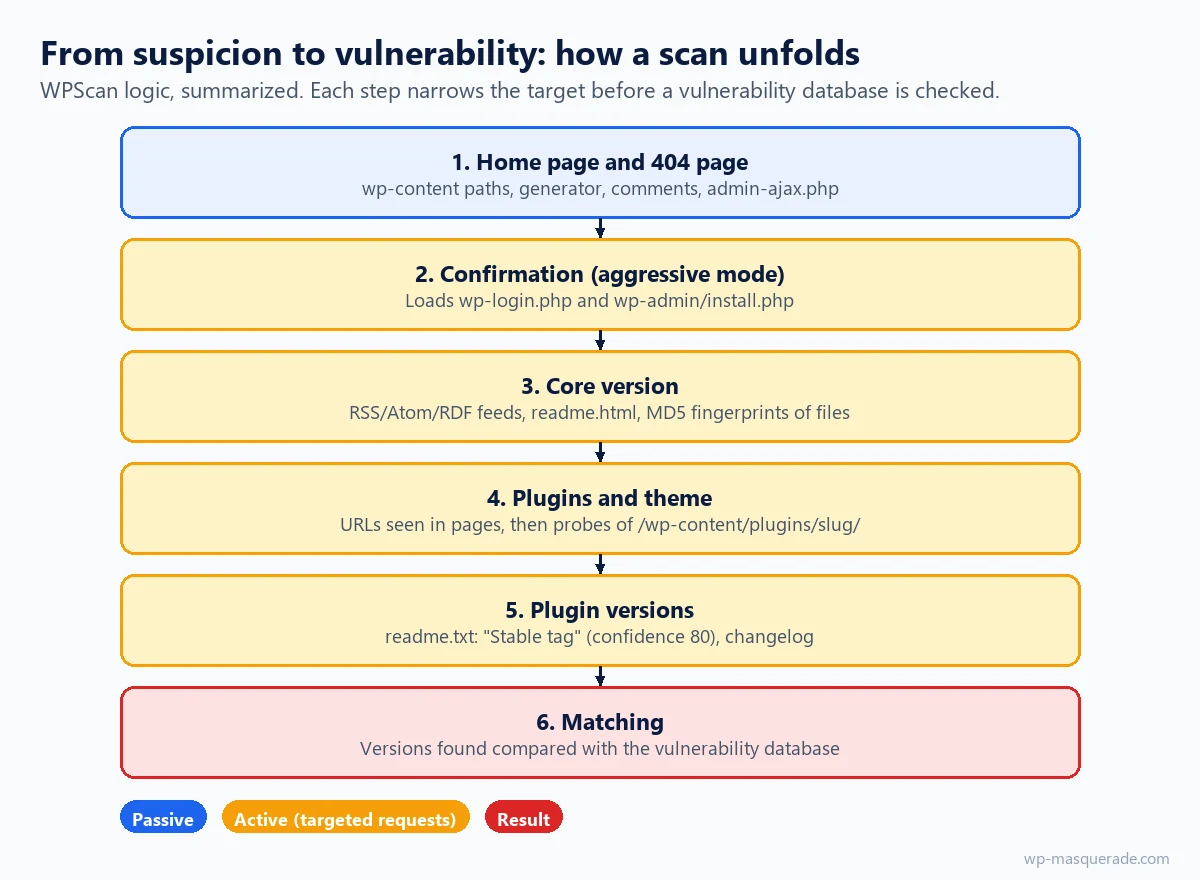
The active steps leave traces: dozens of requests for /wp-content/plugins/.../readme.txt returning 404 within a few seconds are the signature of enumeration. This is also where a defense can step in, by not answering 200 or 403 for files that have no reason to be public.
What you can reduce, and what will stay visible
WordPress lets you remove several of these announcements with simple hooks, for example in a custom plugin:
remove_action( 'wp_head', 'wp_generator' );
add_filter( 'the_generator', '__return_empty_string' );   // feeds included
remove_action( 'wp_head', 'rsd_link' );
remove_action( 'wp_head', 'wp_shortlink_wp_head', 10 );
remove_action( 'template_redirect', 'wp_shortlink_header', 11 );
remove_action( 'wp_head', 'rest_output_link_wp_head', 10 );
remove_action( 'template_redirect', 'rest_output_link_header', 11 );
Note the priority: remove_action() only works if it uses the same priority as when the hook was added (11 for both headers). On the other hand, there is no need to look for wlwmanifest_link: core has not output that Windows Live Writer link since WordPress 6.3.
| Signal | Countermeasure | Effect | Limitation |
|---|---|---|---|
| Generator | the_generator filter | Version removed from pages and feeds | Themes and plugins that write their own generator |
| api.w.org Link | Removing both REST hooks | API announcement removed | The API is still reachable at /wp-json/ |
ver= | Rewriting or removing the parameter | Core version less visible | Can interfere with browser cache busting |
| wp-content paths | URL aliases + server rules | No more /wp-content/ in the HTML | Tricky: CSS, JS and JSON also contain paths |
Plugin readme.txt | Server-level block (404) | Plugin version harder to read | Static file fingerprinting still possible |
| MD5 fingerprints | No simple countermeasure | Only updating removes the vulnerability |
Keep the priorities straight: hiding the version fixes no vulnerability. A bot that cannot identify your site can still try the exploit blindly, and some do. Hiding reduces noise and takes your site off sorted target lists; updates, backups and strong authentication remain the foundation.
Hide WordPress or imitate other software?
Removing the signals leaves a site "without an identity", which is a clue in itself. The other approach is to present the markers of different software. That is the principle behind CMS imitation in WP Masquerade, our WordPress security plugin:
| Feature | Free | Pro |
|---|---|---|
| WordPress generator removed from pages and feeds | Yes | Yes |
| Authentic generator tag from other software | 5 profiles (Joomla!, Drupal, PrestaShop, TYPO3, MediaWiki) | 41 profiles |
| Markers recognized by Wappalyzer (headers, JavaScript variables) | No | Yes |
| RSD, Windows Live Writer and shortlink links removed | Yes | Yes |
| REST API and oEmbed announcements removed | No | Yes |
| Aliases for wp-content, media, wp-includes, plugins, themes | No | Yes |
| Plugin readme and translation files return 404 (Apache, LiteSpeed) | Yes | Yes |
The limitations are documented: plugin and theme folder names remain present under their root folder, CSS and JavaScript files are not rewritten globally, and no result is guaranteed in any detector. See also technical links and file URLs.
Test your own site in ten minutes
- Open a private browsing window (logged out) and view the source: look for
generator,wp-content,wp-includes,ver=. - Open
/feed/and look for the<generator>tag. - Read the headers with
curl -sI https://your-site.com/: is there aLinktoapi.w.org? - Run the Wappalyzer extension on the home page, then on a post.
- Try
/wp-content/plugins/some-plugin/readme.txt: a 200 response gives its version to anyone. - After each change, purge the page cache: an old cached copy can keep the old signals.
- If you run WPScan, do it only on a site you are responsible for.
Key takeaways
- A single signal is enough for Wappalyzer: removing the generator tag is not enough while /wp-content/ remains visible.
- The core version also leaks through feeds, the ver= parameter and file fingerprints.
- WPScan reads the Stable tag in plugin readme.txt files: block those files if they return 200.
- remove_action() requires the same priority as the original hook (11 for the Link headers).
- Hiding reduces automated targeting, but only updates remove a vulnerability.
Sources
- webappanalyzer: technology definitions (w.json, WordPress entry) (opens in a new tab)
- webappanalyzer: README (continuation of Wappalyzer, private since August 2023) (opens in a new tab)
- WordPress Developer: get_the_generator() (opens in a new tab)
- WordPress Developer: rest_output_link_header() (opens in a new tab)
Other sources consulted: official documentation and official vendor pages.