
- 10%commission on the amount paid, excl. VAT
- 12 monthsof commissions on every referred member
- 30 dayscookie after a click on your link
- 30 daysbefore each commission is approved
- €50.00approved balance to get paid
Do you talk about WordPress to clients, readers or students? Every time someone creates an account through one of your links, they are tied to you, and you earn a commission on all their purchases for 12 months: the first purchase, an upgrade, an extra licence. You manage everything from the Affiliate tab of your member area.
From your link to your payout, in four steps
- You share your linkCreate a tracked link per channel in your member area, then publish it in a blog post, a video, a newsletter or a client proposal.
- The visitor signs up and buysThe click sets a cookie valid for 30 days. If they create an account within that time, even at checkout, they are tied to you.
- The commission is approvedIt stays pending for 30 days to cover a possible refund, then it is approved automatically.
- You get paidOnce €50.00 is approved, we pay your balance by bank transfer or PayPal.
Video transcript
The WP Masquerade affiliate program pays you 10% of every purchase made by the members you refer, for 12 months. Create a tracked link in your member area and share it wherever your audience reads you. A visitor who clicks gets a 30-day cookie. If they create an account, they are tied to you for 12 months. Each commission stays pending for 30 days to cover a possible refund, then it is approved. Once €50 is approved, you are paid by bank transfer or PayPal. Your dashboard shows the clicks, sign-ups, purchases and commissions of each link. Joining is free.
What counts for attribution
- The last link clicked wins while the cookie is valid: if the visitor then clicks another affiliate’s link, that link is the one that counts.
- Attribution is final at sign-up: once the account is created, the member stays tied to your link, whatever they click afterwards.
- Each member has their own window of 12 months, counted from their sign-up date.
- Someone who already had an account before clicking your link cannot be attributed to you.
How much can you earn?
Commission is calculated on the amount actually paid, excluding VAT, after any promo code. Enter the number of sales you expect to generate each month for each plan.
Current commission rate: 10%
Monthly sales of each plan × price excl. VAT × commission rate.
Indicative estimate, based on list prices excluding VAT, with no promo code. Later purchases by the same member during their window (an upgrade, an extra licence) come on top of this amount. Refunds cancel the matching commission.
A concrete example: at a 10% rate, a 10-site licence at €149 excl. VAT bought with a 10% promo code is paid €134.10 excl. VAT. Your commission is €13.41. The rate applied is the one in force on the day of purchase; a later reduction never affects a commission already recorded.
Who earns the most from the program
The program is open to anyone with a member account, customer or not. It pays best when you recommend WP Masquerade to an audience that runs its own WordPress sites and buys its own licence.
Web agencies
You deliver sites to clients who keep control of their own subscriptions. Recommending WP Masquerade as part of your maintenance offer shows you take security seriously.
Idea: add your link to the launch guide you hand over to the client, with the plan that suits their site.
WordPress freelancers
Audits, hack clean-ups, redesigns: you are often the one who recommends the plugins. Your advice carries even more weight when it comes at the right moment.
Idea: mention WP Masquerade in your audit report, with a link to the feature that solves the problem you found.
Bloggers and content creators
Tutorials, reviews, security plugin comparisons: your readers are looking for a concrete solution. A link placed in genuinely useful content keeps working for months.
Idea: point each link to the page that follows on from your post (pricing, a feature, a comparison), and create a separate link for each post so you know which one converts.
Trainers
Every WordPress course covers security. Your students leave with a clear recommendation and a tool they can install the same day.
Idea: for a webinar or a session, ask us for a promo code reserved for your attendees.
Hosts and hosting resellers
Your WordPress customers ask you how to protect their site. WP Masquerade works with the major hosts and caching systems, which makes it an easy recommendation to build into your support.
Idea: mention it in your WordPress getting-started guide or your knowledge base, where your customers already look for help.
Licences you buy for yourself, your business or an account you control do not earn a commission: the program rewards recommendations, not internal purchases.
Your promotion tools
- Up to 25 tracked links, one per campaign, channel or medium, each with its own statistics. You can rename and deactivate them at any time; members who already signed up through a deactivated link remain yours.
- A link to any page of the site: add
?ref=followed by your link code to the address of the home page, the pricing page, a feature or a blog post, in your audience’s language. - Clean addresses: after the click, the visitor is redirected to the same page without the parameter, which avoids duplicate URLs in search engines.
- Content worth citing: feature pages, the free vs Pro comparison, blog posts and glossary definitions give you precise sources to recommend.
- A promo code for your events, on request: webinar, training course, conference. Write to us to discuss it.
The program does not provide a banner kit: you present WP Masquerade in your own words, with your own screenshots and experience, which is still the most credible recommendation for your audience.
A dashboard to manage your links
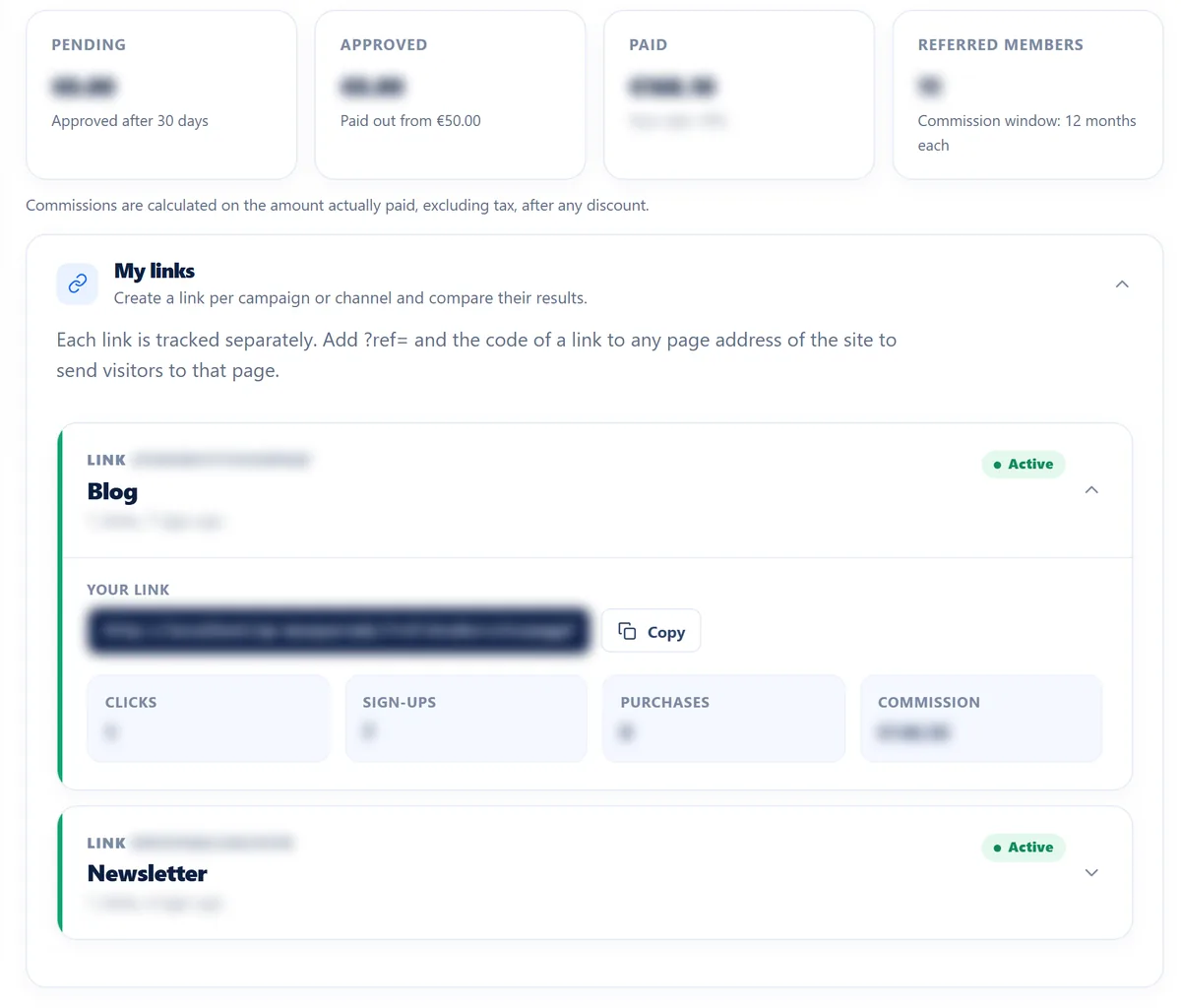
The Affiliate tab of your member area brings together everything you need to see what works:
- your pending, approved and paid balances, and the number of referred members;
- the clicks, sign-ups, purchases and commissions of each link. A click is counted once per link, per visitor and per day, and bots are filtered out: your figures reflect real visits;
- your referred members, the end of their commission window and the commission on each of their purchases;
- your payout history, with the date, amount, method and reference.
Out of respect for our customers, you never see the name, email address or site of the members you refer: they appear under a pseudonym, for example “Member #7KQ2”. That is enough to track your results, and it is a trust point you can share with your audience.
How your commissions are approved and paid
| Status | What it means |
|---|---|
| Pending | The commission is recorded. It stays pending for 30 days to cover a possible refund. |
| Approved | The period has passed with no refund: the commission is added to your payable balance. |
| Paid | The commission has been paid to you. |
| Cancelled | The purchase was refunded or disputed, or it did not meet the program terms. |
As soon as your approved balance reaches €50.00, we pay it to you by bank transfer or PayPal. Payouts are made manually, with no fixed schedule. A partial refund reduces the commission proportionally; if a refunded commission had already been paid, its amount is deducted from your next payouts.
Protected bank details
- Your IBAN is validated when you enter it, stored encrypted and only ever displayed partially masked.
- Changing or deleting your payout details requires your current password.
- Every change is notified to you by email, and to our team.
- After a change, payouts to the new details resume only after a security delay of 7 days: if someone gets into your account, they cannot divert your earnings overnight.
You remain responsible for declaring this income according to your situation. If you are a business, you send us an invoice for each payout.
The program rules at a glance
Allowed and encouraged
- Presenting WP Masquerade in your own words, with your own tests and screenshots
- Publishing tutorials, comparisons and first-hand feedback
- Creating one link per channel and placing it on the most useful page
- Recommending the product to your clients, readers and students
- Telling your audience that your links are affiliate links
Prohibited
- Buying through your own link, for yourself or an account you control
- Spam: unsolicited emails, mass messages, automated comments
- Paid ads on the WP Masquerade brand, and using it in a domain or account name
- Misleading promises: an “unhackable” site, a made-up discount or feature
- Cookie stuffing, fake clicks, fake accounts and hacking
- Promo codes that were not given to you for the program
Zero tolerance for hacking, spam and fraud. These practices can lead to immediate removal from the program and the cancellation of all your unpaid commissions, both pending and approved. Full details are in the affiliate program terms.
Frequently asked questions
Do I need to be a customer to become an affiliate?
No. A free member account is enough. That said, having tried WP Masquerade helps you talk about it accurately.
Do renewals earn a commission?
Yes, if they are paid within the commission window of 12 months that follows the member’s sign-up, like all their other purchases. An annual licence renews automatically one year after purchase: with a 12-month window, the renewal usually falls just after the window ends and so does not earn a commission.
What happens if a visitor clicks links from two affiliates?
The last link clicked before sign-up wins. Once the account is created, the attribution no longer changes.
Can I use my link to buy my own licence?
No. Purchases made for yourself, your business or an account you control do not earn a commission, and a purchase with your own email address is rejected automatically.
When and how do I get paid?
By bank transfer or PayPal, as soon as your approved balance reaches €50.00. Each commission is approved 30 days after the purchase if it has not been refunded. Remember to enter your payout details in your member area.
Can I find out who bought through my link?
No. You see a pseudonym, the dates, the number of purchases and the commissions, never the member’s name, email address or site.
Can I offer a promo code to my audience?
Only a code we have given you for the program. To request one, for example for a webinar or a training course, write to us from the contact page.
Ready to recommend WP Masquerade?
Join the program in a few clicks from your member area and create your first tracked link. Already a member? Log in to open the Affiliate tab.
Join the affiliate program
Any questions? Contact us or read the affiliate program terms.