On October 21, 2026, WPScan disclosed two stored XSS vulnerabilities in LiteSpeed Cache, CVE-2026-113499 and CVE-2026-113500, rated 7.5 (high). With nothing more than a published comment, an unauthenticated visitor can get JavaScript executed in your visitors' browsers, administrators included, provided one of two optimization settings is turned on. Here is which sites are affected, how to tell whether yours are, and what to do; version 7.9.2 fixes both vulnerabilities.
What happened
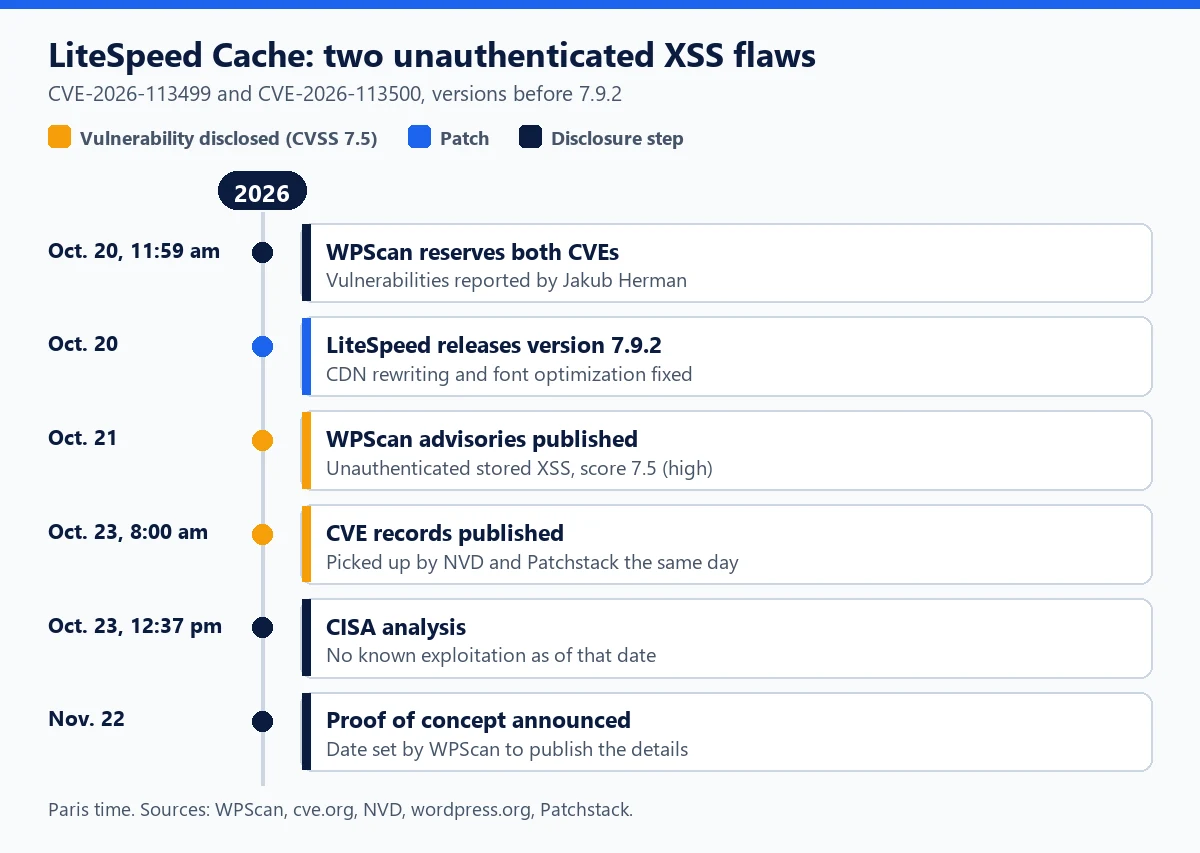
Both vulnerabilities were found by researcher Jakub Herman and coordinated by WPScan, which reserved their CVE identifiers on October 20 at 11:59 a.m. (Paris time). The same day, LiteSpeed Technologies released version 7.9.2 of the plugin. Its changelog does not cite the CVEs but mentions, among other hardening changes, preventing HTML injection while rewriting URLs in inline CSS (CDN module) and protecting HTML boundaries when rewriting resources (optimization module).
WPScan put its two advisories online on October 21. The CVE records were published on October 23 at 8:00 a.m., picked up the same day by the US NVD database and by Patchstack, which rates the vulnerability as high priority. On October 23 at 12:37 p.m., the CISA analysis (Vulnrichment program) indicated exploitation "none": no known attack as of that date. As of this writing, no security vendor has reported exploitation, and WPScan is holding back the proof of concept until November 22, 2026 "to give users the time to update".
The same version 7.9.2 fixes a third vulnerability, CVE-2026-113501 (3.1, low): a logged-in subscriber could dismiss warnings that the plugin presents as non-dismissible, including the one that flags publicly accessible sensitive files. On October 22, Patchstack also published a sensitive data exposure (CVE-2026-114190, 5.9) already fixed in 7.9.1.
Who is affected
LiteSpeed Cache has more than 7 million active installations (wordpress.org). WPScan considers all versions before 7.9.2 vulnerable. But a site is only exposed if three conditions are met: comments are open, the attacker's comment is published, and the relevant setting is turned on.
| Item | CVE-2026-113499 | CVE-2026-113500 |
|---|---|---|
| WPScan title | Unauthenticated stored XSS via CDN inline CSS rewriting | Unauthenticated stored XSS via font display optimization |
| Setting involved | CDN, "Use CDN Mapping" with "Include Images" | Page Optimization, CSS, "Font Display Optimization" |
| Default | Off | Off, but turned on by the Advanced (recommended), Aggressive and Extreme presets |
| Affected versions | Before 7.9.2 | Before 7.9.2 |
| Fixed version | 7.9.2 (October 20, 2026) | 7.9.2 (October 20, 2026) |
| CVSS 3.1 score | 7.5, high | 7.5, high |
| Account required | None, but the comment must be published | None, but the comment must be published |
| Known exploitation | None reported as of October 25 | None reported as of October 25 |
The settings that open the door
WPScan's advisories only refer to "the relevant option". The title of each advisory and the version 7.9.1 code make it possible to name it. For CVE-2026-113500, it is "Font Display Optimization" (CSS tab of the Page Optimization settings), which adds font-display: swap to @font-face rules. It is off by default, but the "Advanced" preset, which the plugin labels as recommended, turns it on, as do "Aggressive" and "Extreme". If you have applied one of these presets, consider your site affected. In the code published on wordpress.org, this whole-page processing appears in version 7.8 (March 2026); WPScan does not make that distinction.
For CVE-2026-113499, it is the rewriting of url() addresses in inline CSS to point to a CDN. It only runs if "Use CDN Mapping" is turned on with a mapping that includes images. No preset turns it on: you must have configured it yourself, which mostly affects sites that serve their media from an external CDN.
How the attack works
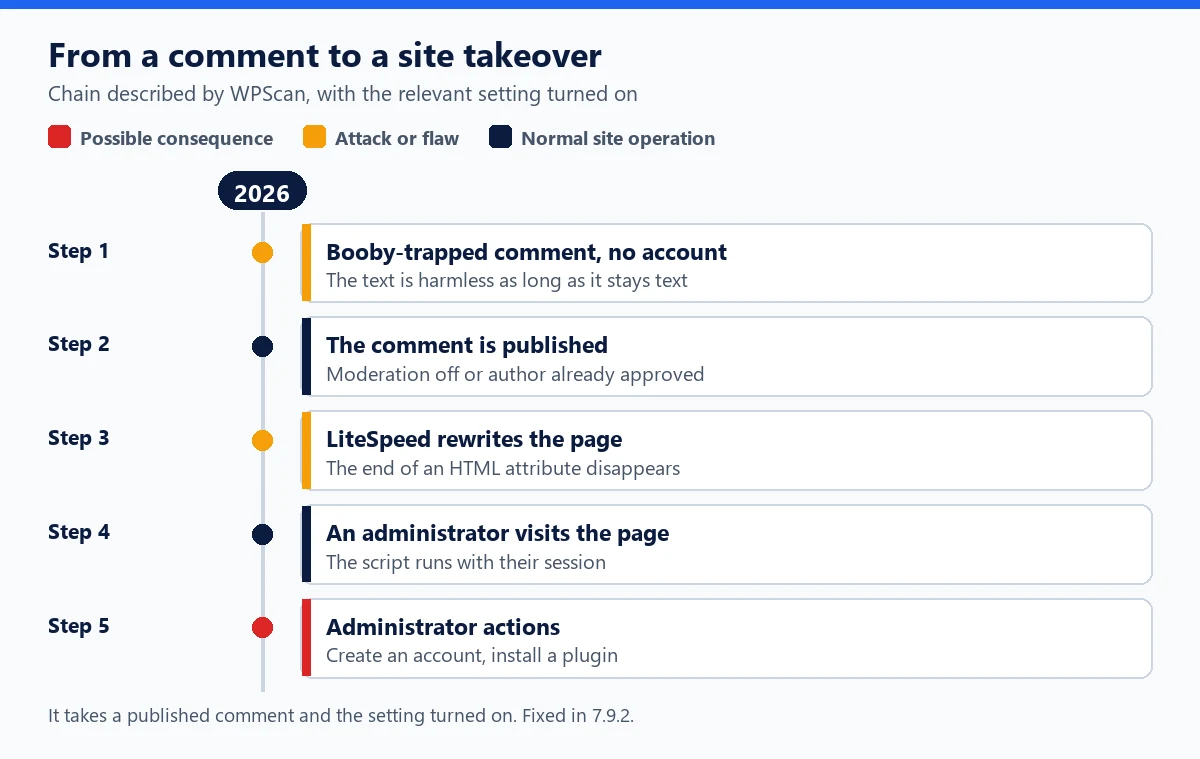
To speed up display, LiteSpeed Cache touches up your pages' HTML before sending it: it adds an instruction to font declarations, and it replaces image URLs with the CDN's. These touch-ups should only target CSS. According to WPScan, they actually applied to the whole page, comments included. When rewriting a passage that looks like CSS, the plugin removes a quote or the marker that closes an HTML attribute.
That is where the comment author's name comes in. WordPress stores it as text, and it stays harmless as long as the page keeps its structure. Once the attribute is improperly closed, part of that text becomes a new attribute, for example an event handler such as onmouseover, which the browser executes. The payload is stored: every visitor to the page receives it, and if the page is cached, it is served as is to everyone. WPScan has not published the details of the payload, and neither will we.
The 7.5 score reflects these limits: an unauthenticated attack with maximum impact, but high complexity (it takes the right setting and a published comment) and victim action (visiting the page). The comment is published automatically if moderation is off, or if your site automatically approves authors who "have a previously approved comment": the attacker first posts a harmless message, then the trap. Version 7.9.2 limits font optimization to <style> blocks and performs CDN rewriting with the HTML structure taken into account.
Why an XSS can cost you the whole site
The injected script runs in the browser of the person viewing the page, with their permissions. For an anonymous visitor, it can redirect to a fraudulent site. For a logged-in administrator browsing their own site, it can send requests to the dashboard on their behalf: create an administrator account, install a plugin, edit a file. That is what makes an unauthenticated stored XSS so serious, as our article on XSS vulnerabilities in WordPress explains.
LiteSpeed Cache has been through this before. In May 2024, WPScan described a wave of attacks against CVE-2023-40000, another unauthenticated stored XSS: the injected JavaScript created administrators named wpsupp-user or wp-configuser. Our article on the LiteSpeed Cache privilege escalation vulnerabilities of 2024 looks back at that dark year. In August 2026, CVE-2026-18978 already allowed an unauthenticated XSS through comment content, fixed in 7.9.
Checking your site
WPScan has published neither indicators of compromise nor attacker addresses. The checks below follow from the described mechanism. Start with the version and the two settings, using WP-CLI:
wp plugin list --name=litespeed-cache --fields=name,version,status
wp litespeed-option get optm-css_font_display
wp litespeed-option get cdn
wp litespeed-option get 'cdn-mapping[inc_img][0]'
On version 7.9.2 or later, these vulnerabilities are closed. On an earlier version with one of the settings turned on, continue:
- Recently published comments:
wp comment list --status=approve --number=100 --fields=comment_ID,comment_date,comment_author,comment_author_url. An author name containing quotes, angle brackets, code or words likeonmouseover=has no business being there. - Administrators:
wp user list --role=administrator --fields=ID,user_login,user_email,user_registered. An unknown or recently created account is a warning sign. - Application passwords:
wp user application-password list <username>for each administrator. - Plugins and files:
wp plugin list --fields=name,version,status,wp plugin verify-checksums --all,wp core verify-checksumsandfind wp-content -name "*.php" -mtime -60 -type fto spot PHP files modified in the last 60 days.
What to do now
- Update to 7.9.2 (Plugins, Installed Plugins, or
wp plugin update litespeed-cache), then purge the entire cache, including the CDN's:wp litespeed-purge all. - If the update has to wait, turn off "Font Display Optimization" and CDN rewriting, then hold new comments for moderation (Settings, Discussion) until you update.
- Delete the suspicious comments found above and, if needed, uncheck automatic approval of previously approved authors.
- If there is any sign of compromise: delete unknown accounts, change administrator passwords, revoke application passwords, renew the salts in
wp-config.php(wp config shuffle-salts), scan the site and restore a clean backup. Our guide to cleaning up a hacked WordPress site details each step.
Reducing exposure next time
The patch came out the day before the advisories and a month before the announced proof of concept: a site updated in the following days closed the door before the attack details became public. A few habits shrink that window:
- turn on automatic plugin updates, at least for security releases;
- get vulnerability alerts and track pending updates across all your sites;
- limit the number of administrators and avoid browsing the public site with that account when an Editor account is enough (principle of least privilege);
- only turn on the optimizations you need, moderate comments and keep off-server backups;
- add a web application firewall capable of virtual patching: Patchstack says it has released a rule for this vulnerability (WAF comparison).
WP Masquerade Pro can help with monitoring, without replacing the update. The vulnerability alerts compare the installed versions of wordpress.org plugins with the public WPVulnerability.net database every day and notify you by email: a LiteSpeed Cache version earlier than 7.9.2 is flagged as soon as the database lists these vulnerabilities. The alert does not know whether your settings expose you; it is based on the version.
The activity log records, from the moment it is activated, the creation of a user, a role change or the activation of a plugin: an administrator created by an injected script shows up there. The integrity check covers WordPress core files only. The member area brings together the pending updates and vulnerable sites of all your sites. It alerts, it does not fix and it is not a firewall. For context, here is the full history of LiteSpeed Cache vulnerabilities.
Key takeaways
- CVE-2026-113499 and CVE-2026-113500 (7.5) affect LiteSpeed Cache before 7.9.2; fixed in 7.9.2 on October 20, 2026.
- A comment published without an account is enough, if "Font Display Optimization" (turned on by the recommended preset) or CDN image rewriting is active.
- No exploitation reported as of October 25; proof of concept announced for November 22.
- Update, purge the cache, check recent comments and administrator accounts.
Sources
- cve.org: CVE-2026-113499 (October 23, 2026) (external link, opens in a new tab)
- cve.org: CVE-2026-113500 (October 23, 2026) (external link, opens in a new tab)
- wordpress.org: LiteSpeed Cache, changelog (version 7.9.2 of October 20, 2026) (external link, opens in a new tab)
Other sources consulted: further CVE records, trade press articles, WPScan and Patchstack databases.