What the alerts do
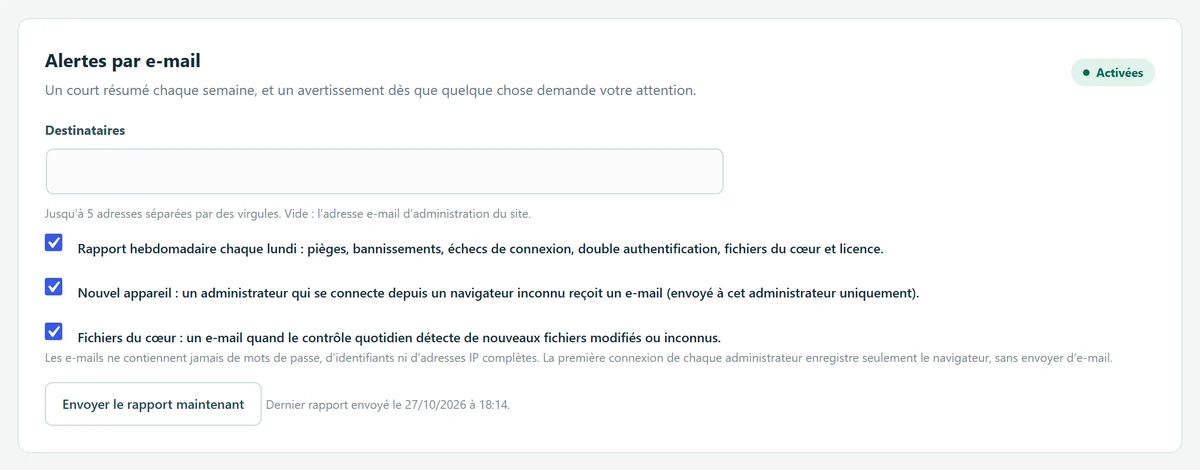
WP Masquerade Pro emails you when something needs your attention, and sends you a short summary every week. There are three alerts, all on by default and each adjustable on its own in the Monitoring tab:
| Alert | When | Recipient |
|---|---|---|
| Weekly report | Every Monday: traps, bans, failed logins, administrators without two-factor authentication, core file status and license status. | Alert recipients |
| New device | An administrator logs in from a browser their account has never used before. | That administrator only |
| Core files | The daily integrity check finds new modified, missing or unknown files. | Alert recipients |
Why it matters
Security tools are useless if nobody looks at what they find. An administrator login from an unknown browser is often the first sign of a stolen password; a modified core file is often the first sign of a compromised site. Getting the news by email gives you time to act. The Monday report also flags settings worth revisiting, such as an administrator who hasn’t turned on two-factor authentication.
What’s included Pro feature
- Up to 5 recipients; leave the field empty to use the site’s admin email address.
- Every recipient who has an account on the site gets the email in their profile language.
- The “new device” alert goes only to the administrator concerned, with clear steps if it wasn’t them: change the password, turn on two-factor authentication, review the list of administrators.
- A Send report now button to test delivery.
How to set them up
- Go to WP Masquerade → Monitoring (the mask icon in the admin menu), “Email alerts” card.
- Enter the recipients, separated by commas, or leave the field empty.
- Check or uncheck each of the three alerts, then save.
- Click Send report now and check your inbox, including the spam folder.
What the emails contain
The emails never include a password, a username or a full IP address. The new device alert shows the date, the network (truncated IP address) and a short browser description, for example “Firefox 128 on Windows”.
To recognize browsers, the plugin sets a random cookie in the browser of each administrator who logs in and stores only its hash, for the last 10 browsers of each account. Failed logins are counted per day, without IP addresses, for 60 days. This data stays on your site.
Limits and precautions
- The first login sends nothing: once the feature is turned on, each administrator’s first login only records their browser. Alerts start after that.
- A browser that clears its cookies, or a private browsing window, counts as a new device. At most one email every 10 minutes per user.
- Your site must be able to send email: if the test report doesn’t arrive, install an SMTP plugin or ask your host.
- Sending relies on WP-Cron; on a low-traffic site, the Monday report may go out a little late.
- Alerts inform, they don’t block anything: when they report a problem, it’s up to you to act.
With Pro. The Monitoring tab also includes the administrator activity log (who did what, and when) and vulnerable plugin alerts, sent to the same recipients. If you manage several sites, your member area can also email you every Monday a summary of the sites waiting for an update.
Start free, upgrade to Pro when you’re ready
The free version already hides WordPress, moves the login page, blocks XML-RPC and counts bots. Pro locks down logins, renames file URLs and monitors your sites for you: known vulnerabilities, core integrity, activity log, email alerts and the update status of all your sites in your member area. From €59 per year excl. tax, far less than the cleanup offers whose prices we checked. Compare the costs.