
Malware is short for malicious software. The NIST glossary defines it, in essence, as software or code inserted into a system, usually covertly, to compromise the confidentiality, integrity or availability of its data and functions. The term covers both a virus on a personal computer and a few lines of PHP slipped into a WordPress theme.
The main families
- Virus: code that attaches itself to a file or program and spreads when that file or program runs.
- Worm: a program that spreads on its own from one machine to another over the network.
- Trojan horse: software that looks useful but hides a malicious function. Pirated themes and plugins are the textbook example on WordPress.
- Spyware: collects information (keystrokes, credentials, browsing) without the user's knowledge.
- Ransomware: encrypts or locks data and demands a ransom.
- Backdoor and web shell: hidden access that lets the attacker come back.
Malware on a website
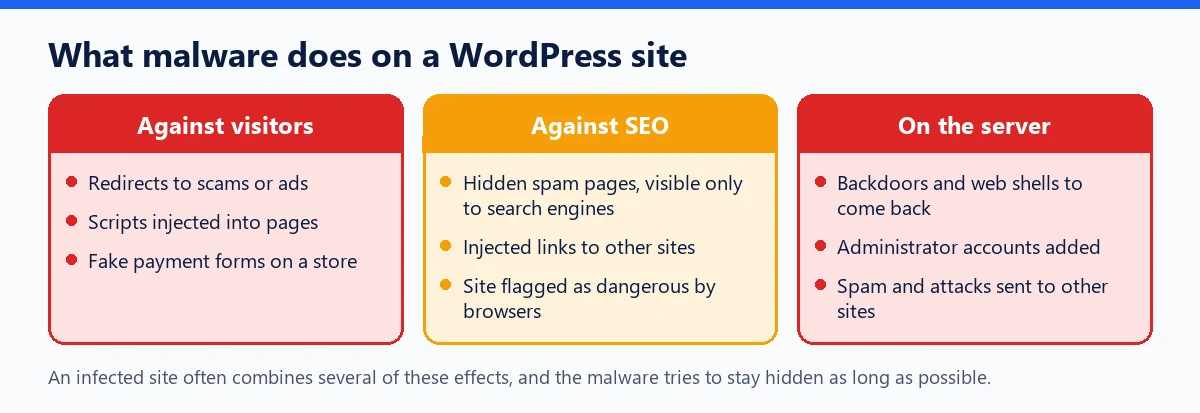
On a website, malware rarely takes the form of an executable file. It consists of PHP or JavaScript scripts added to files, or content injected into the database. It gets in through an unpatched plugin vulnerability, a stolen password, a “nulled” plugin downloaded outside official channels, or, more rarely, through a supply chain attack that booby-traps a legitimate update.
Pirated versions of themes and plugins deserve a special mention: our article on “nulled” plugins and their backdoors sums up what researchers have found in them.
Signs of an infection
- visitors, especially on mobile, redirected to another site, while you see nothing when logged in;
- unknown pages in search results, often in another language;
- a warning from the browser or from Search Console;
- an administrator nobody created, PHP files in the media folder.
Our guide Has my WordPress site been hacked? lists the checks to run, and the step-by-step cleanup procedure explains how to get back to a clean slate.
For WordPress: reducing the risk
- Only install themes and plugins from the official directory or from their developer, and keep them up to date.
- Disable the Dashboard file editor with
define( 'DISALLOW_FILE_EDIT', true );inwp-config.php. - Apply strict permissions: the WordPress documentation suggests 755 for directories and 644 for files.
- Keep regular backups, of both files and database, so you can restore a clean version.
WP Masquerade is not an antivirus and does not clean up an infected site. Its integrity check compares the WordPress core files against the official list every day and reports modified files or unknown PHP files; it does not check plugins, themes or media.