The wp-config.php file holds your database credentials and the secrets that sign your sessions. A few constants in it significantly harden a WordPress site; others, when misunderstood, quietly turn protections off. Here is what each setting really does, checked against the current WordPress source code, and the recommended configuration for production.
Keys and salts: what they are really for
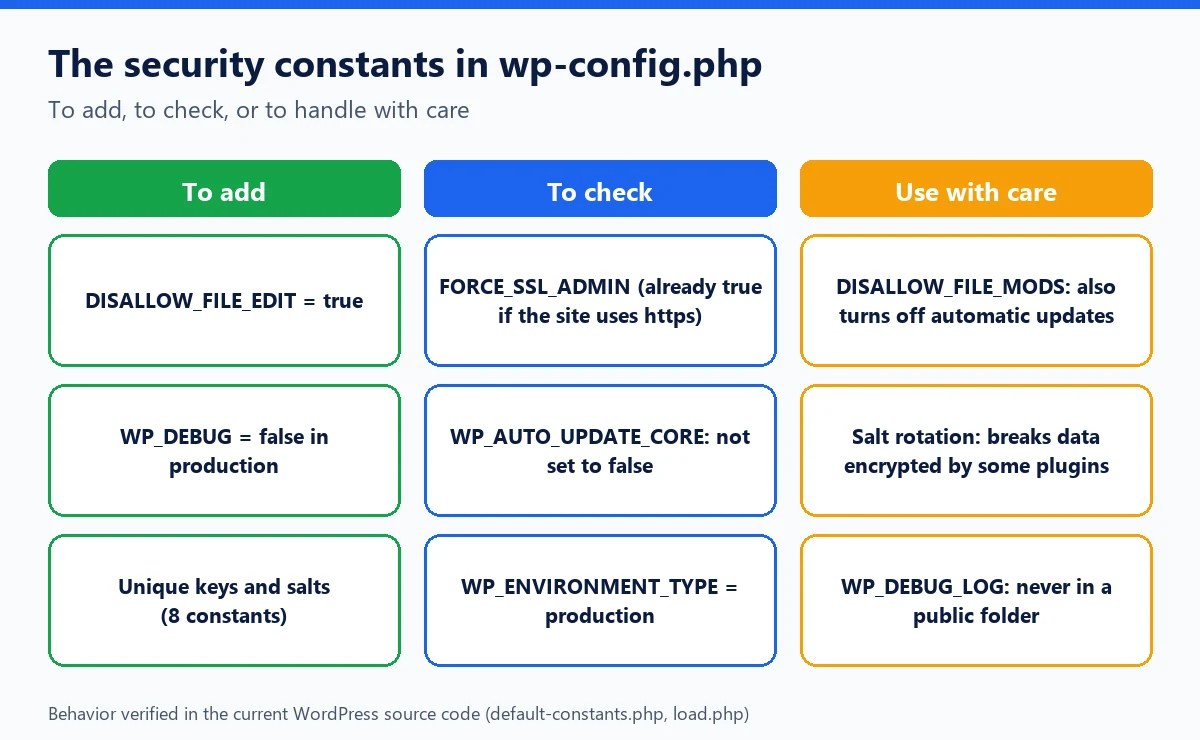
The template file wp-config-sample.php defines eight constants: AUTH_KEY, SECURE_AUTH_KEY, LOGGED_IN_KEY, NONCE_KEY and their four matching salts. They are used to sign WordPress login cookies and security tokens (nonces). An attacker who knows them can forge valid cookies, so a site that keeps the sample values is seriously exposed.
Two common misconceptions need correcting:
- they are not used to hash user passwords. Since WordPress 6.8, passwords are hashed with bcrypt, independently of these constants;
- changing them logs everyone out: the comment in the template file says so, all sessions become invalid.
Generate them with the official service https://api.wordpress.org/secret-key/1.1/salt/, which returns eight lines ready to paste.
Should you rotate them regularly?
No, not without a reason. The WordPress hardening documentation itself links to a technical analysis titled "why you should not rotate your salts." Its argument: many plugins use these values to encrypt data, such as two-factor authentication secrets or API keys. Changing them makes that data unreadable. Change them when they may have leaked: a hacked site, an exposed backup, a file published by mistake, a former contractor.
Turning off the file editor: DISALLOW_FILE_EDIT
By default, an administrator can edit the PHP code of themes and plugins from the Dashboard. If an administrator account is stolen, the editor becomes a direct way to inject code.
define( 'DISALLOW_FILE_EDIT', true );According to the WordPress hardening guide, this line amounts to removing the edit_themes, edit_plugins and edit_files capabilities. The same guide spells out its limits: it does not stop an attacker from uploading malicious files by other means. It is a measure with no side effects for almost every site, and you should apply it as a matter of course.
DISALLOW_FILE_MODS: stronger, and riskier
DISALLOW_FILE_MODS goes further: it also blocks installing and updating plugins and themes from the Dashboard. But the WordPress code reveals a lesser-known effect: the wp_is_file_mod_allowed() function returns false for every context, including the automatic updates routine. With this constant, minor core security updates no longer install themselves.
Reserve it for sites whose updates are deployed by other means (Git, a deployment tool, the host), with a process that actually keeps up with fixes.
FORCE_SSL_ADMIN: often already on
FORCE_SSL_ADMIN enforces HTTPS for login and the admin area, so passwords and cookies never travel in clear text. The default-constants.php file shows that if you do not define it, WordPress automatically sets it to true when the site address starts with https. Defining it explicitly is still useful to document the choice, or when the stored address is still http. The old FORCE_SSL_LOGIN constant has been deprecated since WordPress 4.0.
WP_DEBUG in production
Debugging is essential in development and dangerous in production, for two reasons.
- Displaying errors (
WP_DEBUG_DISPLAY, true by default whenWP_DEBUGis on) reveals file paths, queries and plugin names to any visitor. - The log (
WP_DEBUG_LOGset totrue) is written by default towp-content/debug.log, an address every bot knows. It can contain sensitive data: in 2024, a LiteSpeed Cache flaw (CVE-2024-44000) relied precisely on session cookies written to this file.
In production, keep WP_DEBUG set to false. For a one-off diagnosis, since WordPress 5.1 WP_DEBUG_LOG accepts a path: put the log outside the web root, and turn display off.
define( 'WP_DEBUG', true );
define( 'WP_DEBUG_DISPLAY', false );
define( 'WP_DEBUG_LOG', '/home/account/logs/wp-debug.log' ); // outside the web root
Remove these lines and the log file once the problem is solved.
| Constant | Recommended production value | Verified effect | Pitfall |
|---|---|---|---|
| Keys and salts | Unique generated values | Sign cookies and nonces | Changing them logs everyone out and can break encrypted data |
DISALLOW_FILE_EDIT | true | Removes the file editor | None for most sites |
DISALLOW_FILE_MODS | Only with external deployment | Blocks installs and updates | Also turns off automatic updates |
FORCE_SSL_ADMIN | true | Admin area over HTTPS | Already true by default if the site address uses https |
WP_DEBUG | false | Turns off debug mode | Default log is public in wp-content |
WP_AUTO_UPDATE_CORE | 'minor' (default) or true | Controls automatic core updates | false also turns off security fixes |
WP_ENVIRONMENT_TYPE | 'production' | Declares the environment type | Unknown value: production by default |
Where to put wp-config.php
One level above the root
The wp-load.php file looks for wp-config.php in the WordPress folder, then, if it does not find it there, one level up, provided that parent folder does not itself contain a wp-settings.php (so as not to confuse two nested installations). Placing the file outside the web root guarantees it can never be served by a simple request.
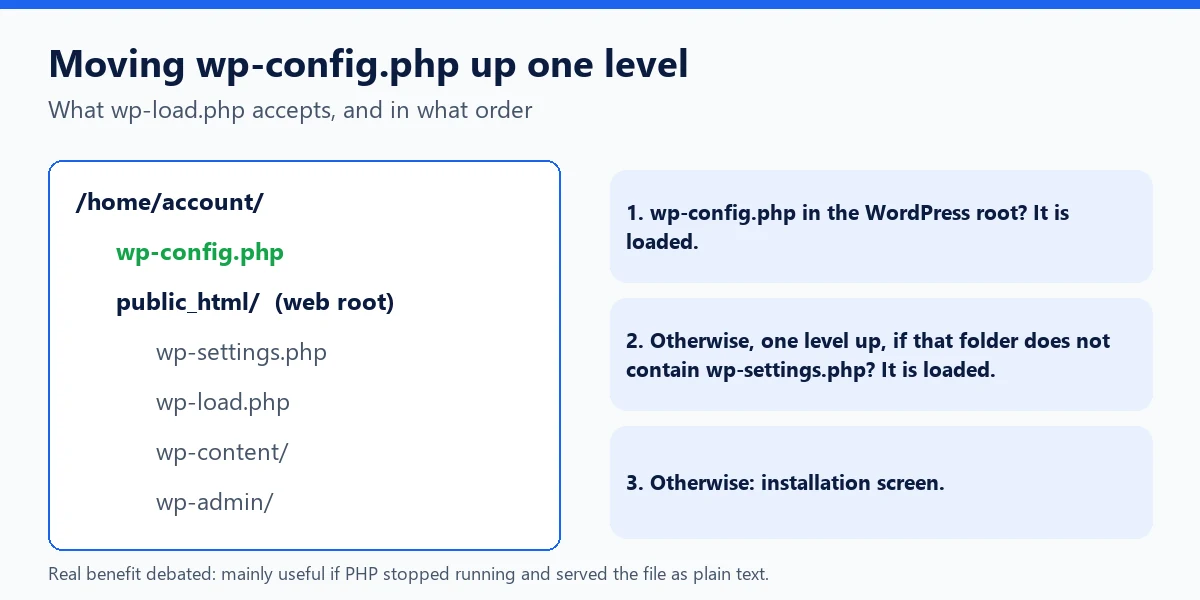
The WordPress hardening guide acknowledges that the benefit is debated: as long as PHP is working, the file is never displayed, because it is executed. Moving it mainly protects against the case where the server stops executing PHP and serves files as plain text. On shared hosting where WordPress is installed directly in public_html, it is simple and safe; in a subfolder, check the structure first.
Permissions and server-level blocking
- Permissions: the hardening guide recommends that only you and the web server can read the file, which usually means
400or440. Depending on the host,600or640may be needed. - On Apache or LiteSpeed, a
<Files "wp-config.php">block containingRequire all deniedin.htaccessblocks direct requests. - Never leave copies lying around:
wp-config.php.bak,wp-config.oldorwp-config.php~are not executed by PHP and would be served as plain text, passwords included.
With WP Masquerade
WP Masquerade never modifies wp-config.php or core files. The free version's bot traps count requests for sensitive files such as .bak backups, which shows what bots are looking for on your site. In the Pro version, two-factor authentication encrypts user secrets with the site keys: its guide points out that after changing the keys, you need to log in with a backup code and then re-enable two-factor authentication. The integrity check compares core files against the official checksums, deliberately excluding wp-config.php, which is unique to each site.
Read also: Understanding WordPress errors and debugging your site.
Read also: How to install WordPress multisite and create a network of sites.
Key takeaways
- Keys and salts sign cookies and nonces; generate them with the official service and change them only after a leak.
DISALLOW_FILE_EDITis a safe measure;DISALLOW_FILE_MODSalso turns off automatic updates.FORCE_SSL_ADMINis already on by default if the site address uses https.- In production:
WP_DEBUGset to false, and never a log in a public folder. - WordPress accepts wp-config.php one level up; delete any backup copy of the file.
Sources
- WordPress Developer Resources: Editing wp-config.php (opens in a new tab)
- WordPress Developer Resources: Hardening WordPress (opens in a new tab)
- Make WordPress Core: WordPress 6.8 will use bcrypt for password hashing (opens in a new tab)
- Official key generator: api.wordpress.org/secret-key/1.1/salt/ (opens in a new tab)
Other sources consulted: official vendor pages and security research publications.