

The attack doesn't try to crack a password: it starts from pairs that are already valid, stolen in data breaches, and tries them elsewhere. OWASP presents it as a particular form of brute force, far more profitable, since each attempt involves a real username and a password that has already worked somewhere.
How credential stuffing works
MITRE (CAPEC-600) sums up what drives the attack: many users keep the same username and password combination across several services. It only takes one of those services to be hacked for the combination to work as a key everywhere else. Lists from breaches, phishing or spyware are traded among attackers, then replayed by bots on thousands of sites.
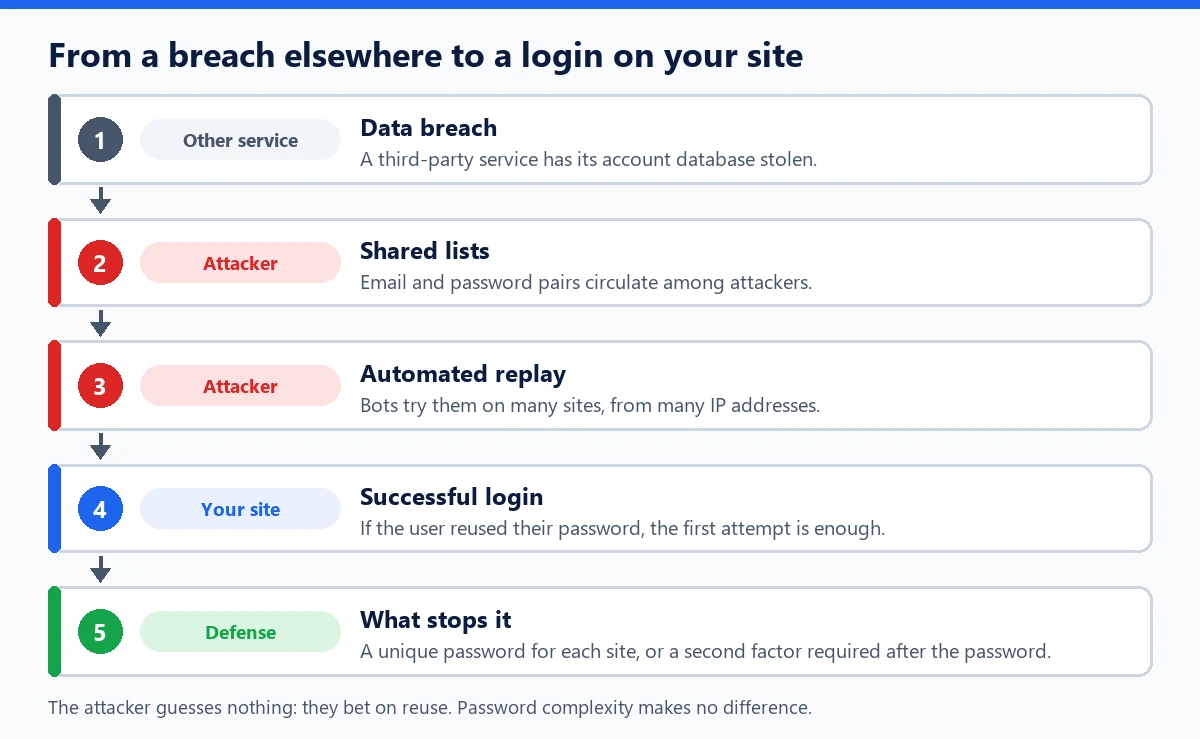
On a WordPress site, the attack targets the login page, XML-RPC and, on a store, customer accounts. WordPress accepts the email address as a login username, so an “email and password” list works on it as is.
Signs in your logs
- many different usernames, often email addresses, with only one or two attempts each;
- a wide variety of IP addresses, sometimes a single attempt per address;
- usernames that never existed on your site, mixed with a few real accounts;
- a successful login from an unusual country or network, with no prior failure.
How to protect against it
- A second factor: OWASP makes it the main defense. A replayed password is no longer enough if a code or a key is required next.
- A different password for each service, generated and remembered by a password manager.
- Rejecting compromised passwords: NIST (SP 800-63B) requires comparing every new password against a list of common or breached passwords. Our article on credential stuffing and password leaks explains how to check a password with Have I Been Pwned without sending it.
- Smart throttling of attempts: MITRE recommends slowing attempts down without letting an attacker deliberately lock out your users' accounts.
For WordPress
Make two-factor authentication mandatory at least for administrators and shop managers. For external application logins (REST API, XML-RPC), use application passwords, specific to each tool, rather than the main password. After a breach involving one of your users, change their password and log out their active sessions from their profile.
In WP Masquerade Pro, login attempt limiting slows down a bot that keeps trying from the same address, but a campaign spread across thousands of addresses stays under the threshold. The decisive defense is WP Masquerade Pro's two-factor authentication, which can be enforced by role: with it, a stolen username and password pair is no longer enough. The principle of authentication factors is covered in its own definition.
Common mistakes
- Believing a complex password protects you: if it is reused, its complexity is worthless.
- Thinking another service's breach doesn't concern you: your users may well have had an account there.
- Relying only on per-IP rate limiting, which is ineffective against distributed replay.