

It is also known as a “UI redressing” attack. MITRE classifies it as CWE-1021: the site doesn't restrict, or improperly restricts, being rendered inside frames that belong to another domain. There is no injected code and no stolen password here: the attacker hijacks a click the victim makes themselves, with their own session.
How clickjacking works
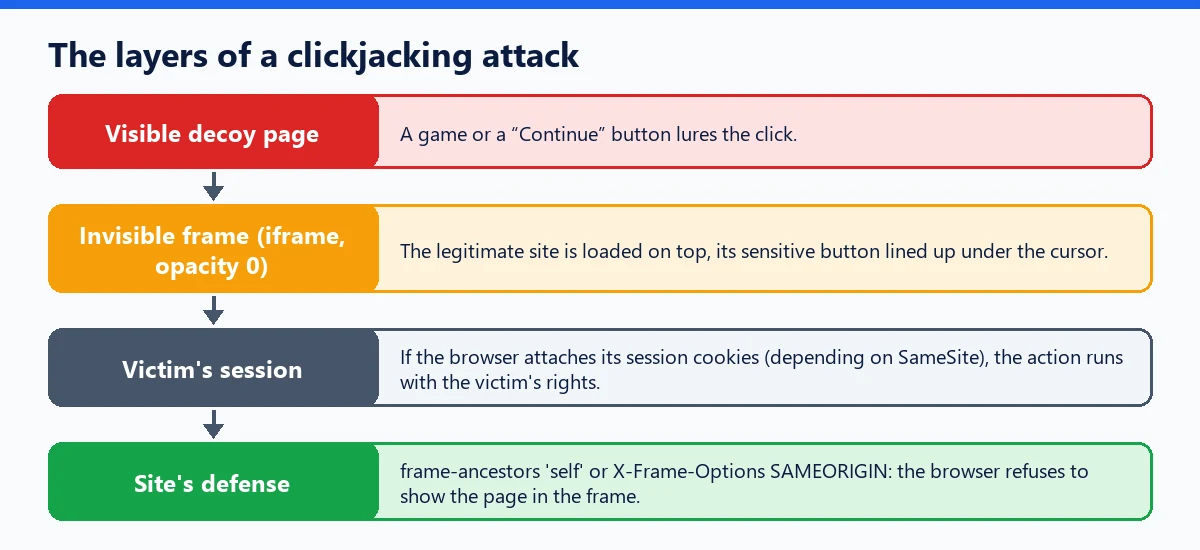
The attacker creates a page that displays something enticing: a game, a “Continue” button, a fake verification. On top of it, they load the target site in an <iframe> made invisible (zero opacity) and place the site's sensitive button exactly under the fake one. If the browser attaches the session cookies to that frame, the logged-in victim triggers the real action: changing an email address, confirming a setting, granting access.
How to protect against it
The protection is simple and relies on the browser: the site states in its HTTP security headers who is allowed to display it in a frame.
Content-Security-Policy: frame-ancestors: the modern directive of the Content Security Policy.'none'forbids any framing,'self'only allows the site itself, and you can list specific origins. It is not honored in a<meta>tag: it must be sent as an HTTP header.X-Frame-Options: the older header, still useful for older browsers. It acceptsDENYorSAMEORIGIN; theALLOW-FROMvalue is obsolete and ignored by modern browsers.
When both are present, the CSP specification says to ignore X-Frame-Options in favor of frame-ancestors; sending both is still recommended. JavaScript “frame-busting” scripts, on the other hand, are easy to bypass and are not enough. SameSite cookies also reduce the risk, without preventing framing. Finally, a recent variant, “double clickjacking,” relies on successive windows rather than a frame: headers don't block it, which is why server-side confirmation is worthwhile for the most sensitive actions.
For WordPress
WordPress already protects its sensitive screens: the send_frame_options_header() function, called on the login page and in the admin area, sends X-Frame-Options: SAMEORIGIN and, in current versions, frame-ancestors 'self'. Public pages, however, get nothing by default. Yet that is where a store's customer account area or profile forms live. You can add the header at the server level, for example in an .htaccess file on Apache:
<IfModule mod_headers.c>
    Header always set X-Frame-Options "SAMEORIGIN"
    Header always set Content-Security-Policy "frame-ancestors 'self'"
</IfModule>
Watch out for an existing CSP: two Content-Security-Policy headers are combined, so the directive should then be added to the existing policy. On Nginx, the equivalent is add_header X-Frame-Options SAMEORIGIN always;. If you'd rather not touch the server configuration, WP Masquerade Pro's security headers send X-Frame-Options: SAMEORIGIN by default across the whole site, without overwriting a header that is already set, while keeping your posts embeddable in other WordPress sites through oEmbed. Our guide to security headers covers the other useful headers and how to test them.