---
title: "Remove WordPress technical links"
description: "Remove what gives WordPress away: RSD, WLW, shortlinks and plugin HTML comments for free, plus REST API and oEmbed discovery links with Pro."
language: "en"
locale: "en-US"
type: "page"
canonical: "https://www.wp-masquerade.com/features/wordpress-technical-links/"
published: "2026-10-27T23:16:51+00:00"
modified: "2026-11-05T20:54:51+00:00"
translations:
en-US: "https://www.wp-masquerade.com/features/wordpress-technical-links/index.md"
fr-FR: "https://www.wp-masquerade.com/fr/fonctionnalites/liens-techniques-wordpress/index.md"
es-ES: "https://www.wp-masquerade.com/es/funcionalidades/enlaces-tecnicos-wordpress/index.md"
de-DE: "https://www.wp-masquerade.com/de/funktionen/technische-wordpress-links/index.md"
it-IT: "https://www.wp-masquerade.com/it/funzionalita/link-tecnici-wordpress/index.md"
pt-BR: "https://www.wp-masquerade.com/pt/recursos/links-tecnicos-wordpress/index.md"
nl-NL: "https://www.wp-masquerade.com/nl/functies/technische-wordpress-links/index.md"
---
# Remove WordPress technical links
WordPress and its plugins add links and signatures to every page that give away its identity. RSD, WLW, shortlinks and plugin comments are removed for free; REST API and oEmbed announcements, with Pro.
## What this module does
In the HTML head of every page, WordPress advertises several technical URLs: remote publishing (RSD, Windows Live Writer), a shortlink like `?p=123`, the REST API announcement, and oEmbed discovery. These links rarely do anything for your visitors, but they tell bots loud and clear that your site runs on WordPress.
The **WordPress technical links** module (called “Discovery” in the guide) removes them, from the most useless to the most impactful.
As soon as WordPress is hidden, the free version also removes the HTML comments and generator tags left by plugins (Yoast SEO, Site Kit, Elementor, cache plugins...): see below.
## Why it helps
These links are among the first clues detection tools read. Removing them completes the [imitation of another CMS](https://www.wp-masquerade.com/features/cms-imitation/): a site that claims to be Drupal but keeps `wp-json` links in every page is quickly unmasked.
## Levels
| Option | Effect | Version |
| --- | --- | --- |
| Remove nothing | All technical links stay in place. | Default |
| Remove remote publishing links | RSD and Windows Live Writer, which are obsolete today. | Free |
| Also remove shortlinks | Removes URLs like ?p=123. | Free |
| Also remove the REST API announcement | The API keeps working; it’s simply no longer advertised. | Pro |
| Also remove oEmbed discovery | Other sites will no longer show rich previews of your posts. | Pro |
*Each option includes the previous ones. Levels 1 and 2 are free; levels 3 and 4 require WP Masquerade Pro.*
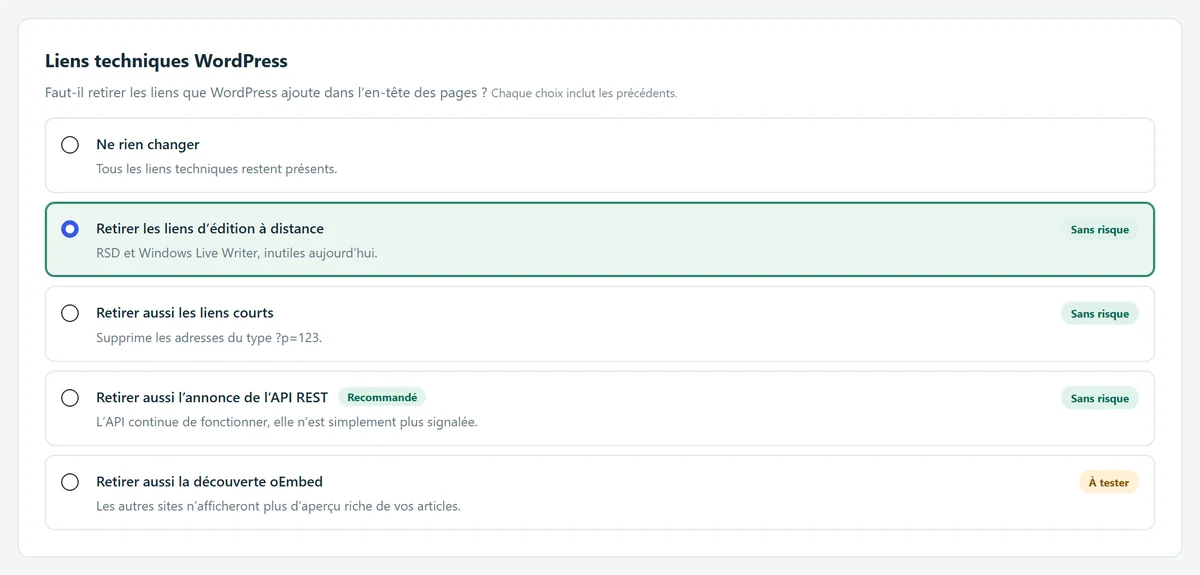
*The five options of the Technical links module (screenshot taken with Pro).*
## Free or Pro
### In the free version Free
- Removes remote publishing links (RSD, Windows Live Writer)
- Removes shortlinks (?p=123)
- Plugin HTML comments and generator tags removed (as soon as WordPress is hidden)
### With WP Masquerade Pro Pro
- Removes the REST API announcement ( tag and HTTP Link header)
- Removes oEmbed discovery
The Essential, Recommended, and Maximum modes set this module to levels 2, 3, and 4. Without Pro, the Recommended and Maximum modes stop at level 2.
## Plugin HTML comments and generator tags
As soon as WordPress is hidden (Identity module at level 1 “Hide WordPress” or above, so in all three modes), the free version also removes the `` tags and the signed HTML comments that well-known plugins and themes add to public pages. These signatures often give the plugin’s name and version, and they are enough for detection tools to recognize WordPress. This feature depends on the Identity module, not on the levels of this module.
- **SEO**: Yoast SEO, Rank Math, All in One SEO, The SEO Framework.
- **Analytics, tags and consent**: Site Kit by Google, MonsterInsights, ExactMetrics, GTM4WP, WP Statistics, Matomo, Meta pixels, Complianz, Jetpack.
- **Cache and performance**: WP Super Cache, W3 Total Cache, LiteSpeed Cache, WP Fastest Cache, Hummingbird, WP-Optimize, Autoptimize; WP Rocket (comment replaced by a generic text).
- **Page builders, themes and frameworks**: Elementor, WPBakery, Slider Revolution, Divi, Redux.
- **Commerce, languages and forms**: WooCommerce, WPML, WPForms, Smash Balloon, and WordPress itself.
**Method**: each plugin’s official setting first (a filter, option or constant provided by its developer), which also applies to the page the cache stores; then an output filter on public pages requested with GET or HEAD; finally the cache plugin’s last filter for LiteSpeed Cache and Hummingbird. Your saved settings are not changed. Kept in place: the imitated software’s generator tag, the content of scripts ([JSON-LD](https://www.wp-masquerade.com/glossary/structured-data/) included) and styles, conditional comments and cache markers.
**Option**: “Remove all HTML comments from public pages” (Identity tab, off by default) also removes your theme’s neutral comments.
**Limitations**:
- Breeze writes its comment into its cache file, with no setting: it is not removed.
- WP Rocket does not allow its comment to be removed: `` remains, with no plugin name.
- Pages cached before activation keep their comments until the cache is purged (“Purge caches” button, Diagnostics tab).
- HTTP headers, CSS classes, JavaScript variables, file URLs and the ?ver= parameter are not affected. Logged-in visitors see the pages without masking.
The plugin-by-plugin details, with the exact strings removed and how to check your site, are in our article [HTML comments and generator tags: erase the traces of WordPress](https://www.wp-masquerade.com/html-comments-generator-tag-wordpress/).
## Limitations and precautions
- Removing a discovery link doesn’t disable the corresponding API.
- Levels 3 and 4 may prevent some apps from discovering the APIs or embedding your posts automatically. Test the integrations you actually use.
- To actually block entry points such as [XML-RPC](https://www.wp-masquerade.com/glossary/xml-rpc/) or the author list, see [hardening](https://www.wp-masquerade.com/features/hardening/).
## Frequently asked questions
**Do I need to configure Yoast SEO, Elementor or my cache plugin to remove their comments?**
No. Masquerade Security turns on their official setting itself while public pages are displayed, without changing your saved settings. Just purge the caches after activation.
**Can removing these comments break my site?**
The content of scripts, styles and JSON-LD is never modified, and the markers cache plugins need (noptimize, mfunc, esi...) are kept. On any error, or for a page larger than 4 MB, the page is sent unchanged.
**Why do I still see the comments in the source code?**
Logged-in administrators see the pages without masking, and a page cached before activation keeps its comments until the cache is purged. Check in a private browsing window after purging the caches.
### Related reading
- [Imitating another CMS](https://www.wp-masquerade.com/features/cms-imitation/)
- [Hardening: XML-RPC, pingbacks, authors](https://www.wp-masquerade.com/features/hardening/)
- [Over 200 camouflaged plugins and themes](https://www.wp-masquerade.com/features/camouflaged-plugins/)
## Start free, upgrade to Pro when you’re ready
The free version already hides WordPress, moves the login page, blocks XML-RPC and counts bots. Pro locks down logins, renames file URLs and monitors your sites for you: known vulnerabilities, core integrity, activity log, email alerts and the update status of all your sites in your member area. From €59 per year excl. tax, far less than the cleanup offers whose prices we checked. [Compare the costs](https://www.wp-masquerade.com/pricing/#cout-piratage).
[See Pro pricing](https://www.wp-masquerade.com/pricing/)
[Download the free version](https://www.wp-masquerade.com/download/)